Capture Companion
For Capture One · Always watching

Never lose a shot.

A safety net for tethered Capture One shoots, USB or Wi-Fi. It watches the tether, your camera settings and your disk on every rig, plus your Wi-Fi signal or your USB speed depending on how you tether, and tells you the moment anything's about to go wrong, right from the menu bar. It's a companion to Capture One, so that's the one app you'll need running.

Notify me at launch Coming soon Notarised · no sandbox · 100% local
✦ macOS 13+✦ USB or Wi-Fi tether✦ Requires Capture One 16+
⚠ Tether down. The kind of alert you'll never miss again.
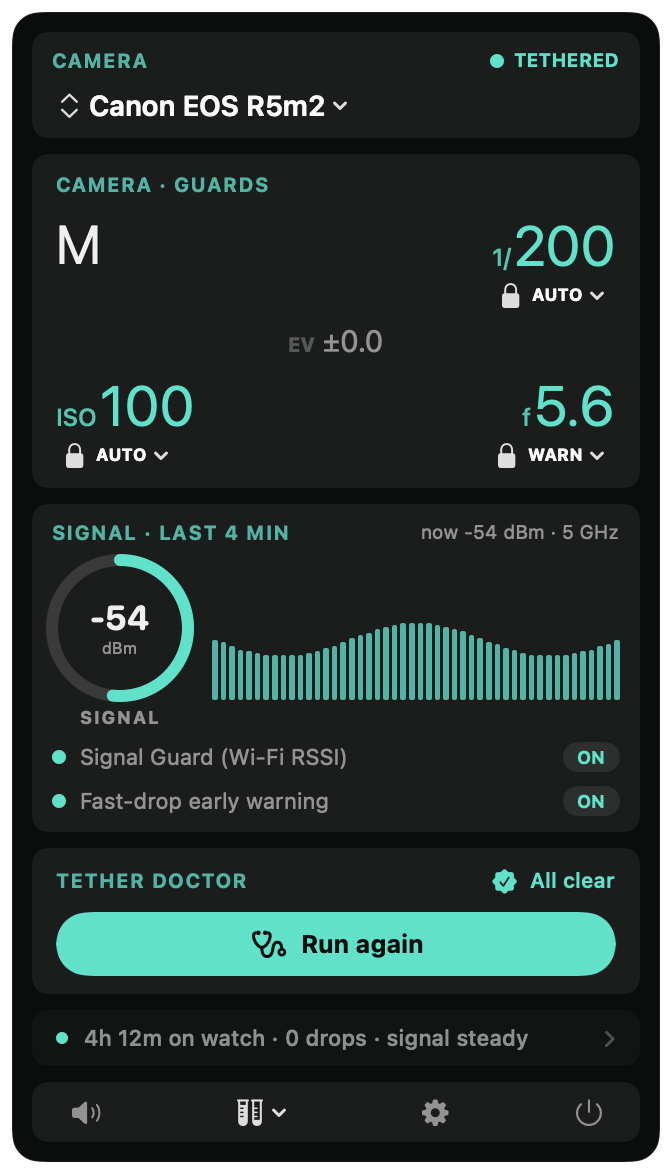
Capture Companion dashboard, camera HUD, signal sparkline, tether doctor.
1s Polling, every second
0 Telemetry, ever
R5 II · GFX Multi camera
Local 100% on your Mac
Always watching · Always ready

Peace of mind. Right from the menu bar.

One glance says the whole rig is healthy. The second it isn't, a card you can't miss, with a sound you choose.

100% · Tue 10:42
CameraTETHERED
Canon R5 II
Camera · Drift
M
1/200
AUTO
EV±0.0
ISO400
AUTO
f5.6
AUTO
Signal · Last 4 minnow -52 dBm · 6 GHz
-52 dBm SIGNAL
Signal Watch (Wi-Fi RSSI)ON
Fast drop early warningON
Rig Checkaudit the router
Disk
2100 GB free FREE
Capture driveof 4000 GB · warns before it fills
Tether DoctorAll clear
Rig Check
Network
Wizard
4h 12m on watch · 0 drops · signal steady
Instant notifications
Wi-Fi Signal WeakConnection may drop.
Tether DroppedCapture One lost the camera, watching for it.
Disk Almost FullOnly 12 GB left.
Shutter ChangedDrifted to 1/160. Warns you, or silently corrects to 1/200.
Aperture ChangedDrifted to f/6.3. Warns you, or silently corrects to f/5.6.
ISO ChangedClimbed to 640. Warns you, or silently corrects to 400.
What it does

Twelve pro shoot habits, automated.

You can't watch the tether bar, the shutter readout and the disk space (and the Wi-Fi signal, if you're wireless) all at once while you shoot. Capture Companion does, and the second anything drifts, you know. The core net works on any tether; the signal tools kick in on a Wi-Fi rig.

Tether disconnect alarm

A floating alert card that sits over fullscreen Capture One the moment the camera drops. With sound, until you silence it.

Shutter & aperture drift alerts

Pin a value as your reference. The Companion can't physically lock the camera, but if the body drifts off it, it warns you, or corrects it back, before you take the next frame.

Wi-Fi signal watch

Reads RSSI off your router and warns you on a fast drop, early enough to move, before the tether actually breaks. Tuned per band for 6 and 5 GHz, where a healthy link reads weaker. And it waits for a held drop before it warns, so a transient blip under a heavy capture burst clears on its own and never cries wolf, while a genuine slide still gets caught. Wireless tethers.

Bus-Speed Watch

Catch a slow tether before it costs you. On USB, a tired cable, the wrong port, or a hub can quietly drop your camera to USB 2.0, and every capture crawls with nothing telling you why. Companion reads your tether's USB speed, shows it at a glance, and warns you the moment it drops, so you can reseat the cable and keep moving. Wired tethers, no router needed.

Tether Doctor

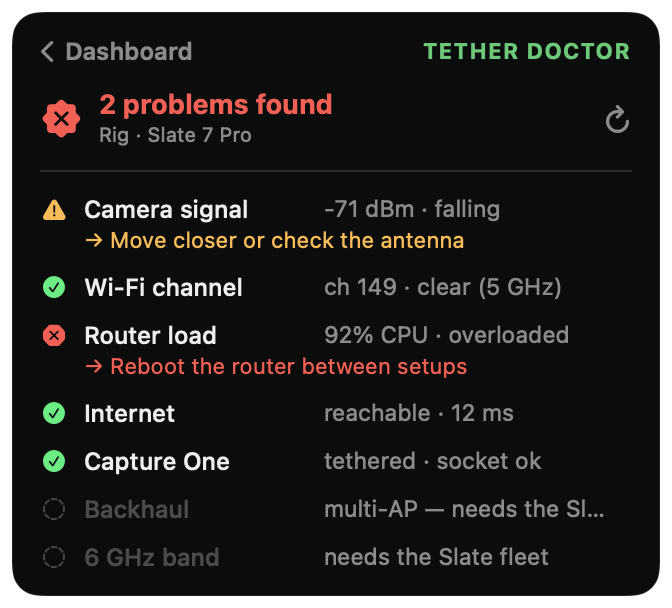
One button. Checks the whole chain, signal, channel, router, internet, Capture One, and tells you in plain English what's wrong.

Network Setup helper

Plain English guidance to get the tether Wi-Fi right, off 2.4 GHz, away from radar prone DFS channels, and it never scans, so it can't drop your link.

Rig Check

Audits your GL.iNet / OpenWRT router and tells you, in plain English, what to change for a rock solid tether. Pin a hopping channel, get off DFS, bump TX power, give each band its own name. Most fixes come with the exact command, copy it and paste it into Terminal to run it yourself. Read only: Rig Check SSHes in only to read your router and show you the command. It never changes a thing itself.

Live exposure HUD

Click the menu bar icon and your whole exposure is right there, Mode, shutter, ISO, aperture and EV. Each value goes green when it's on your reference, red the second it drifts, and the icon itself flips amber on any drift, so you spot it without even opening the panel.

Pin the dashboard

Tap the pin and the whole dashboard floats over Capture One, even in fullscreen, and you can drag it anywhere. Keep a live eye on signal, disk, your locked settings and the session tally while you shoot, instead of reopening it every time.

Disk space watchdog

Three tiers, notice, warning, alarm. So a long shoot never quietly runs out of room.

Silent Mode

One click, or ⌃⌥⌘S, kills every alert sound app wide. For when video's rolling and a beep would ruin the take.

Multi camera profiles

Switch instantly between systems, Canon R5 / R5 II over Wi-Fi, Fuji GFX over USB. The drift alerts configure themselves for the body that's actually plugged in.

Spotlight

One button. Whole tether chain. Plain English.

When the tether feels off, you don't have time to debug. Tether Doctor inspects every link, names what's wrong, and tells you exactly how to fix it, without ever touching the camera connection itself.

Diagnose every link of the chain.

It runs a passive, read only sweep, never an active scan that could drop your tether. Then it ranks what it finds: green for clear, amber to watch, red for fix now. And the rig auto detects itself, so the same button works on a Slate 7 Pro, an MT3000, or whatever GL.iNet you're on today.

  • Camera signal, RSSI + trend, so you catch the slide before it breaks.
  • Wi-Fi channel & band, read passively, so the radio never leaves the channel.
  • Router load, normalised by core count across your fleet.
  • Internet path, separate from the camera link.
  • Capture One ↔ camera, running, with a camera tethered.
Tether Doctor, diagnosing camera signal, Wi-Fi channel, router load, internet, and Capture One in one view.

Which routers can it read?

Works with any camera Capture One sees. Only the live Wi-Fi signal watch reads from your router, so that one part needs a GL.iNet or OpenWRT router. Everything else, detection, the tether, the disk, drift alerts, Bus-Speed Watch and the disconnect alarm, works with any setup.

Full support

Signal watch + every Tether Doctor check.

GL.iNet, Slate 7 Pro, Beryl / MT3000, and the range · plus other OpenWRT routers with SSH

Works

Signal & router read via the generic Linux iw tool.

Most OpenWRT / Linux routers with SSH access (incl. DD-WRT)

Core app only

No SSH to read, signal & router checks off; the alarm, HUD, drift alerts & disk still work.

Stock mesh & consumer routers, Eero, Nest Wifi, Orbi, stock Asus / Netgear / TP-Link

Shooting wired? There's no Wi-Fi link to watch, so the signal watch simply stays off, by design.

Cameras

Works with your camera.

Capture Companion reads Capture One, not your camera. So if Capture One Pro can tether it, you're covered: the disconnect alarm, live HUD, disk watch and Tether Doctor work on every body Capture One tethers. The shutter / aperture / ISO drift alerts work wherever Capture One exposes those values.

Full protection

Alarm · HUD · Tether Doctor · shutter / aperture / ISO drift alerts.

Canon · Nikon · Sony · Phase One / Mamiya / Leaf · Fujifilm · Sigma · Panasonic Lumix · Pentax

Safety net

Alarm · HUD · Tether Doctor. Drift alerts partial or unavailable.

Leica (SL · M · S series) · plus any body where Capture One leaves a value blank

Not supported

Capture One can't tether it, so there's nothing to read.

Hasselblad (X1D · X2D · 907x · H system), these tether in Phocus, not Capture One.

Not sure where your body lands? If it's on Capture One's tethering list, the alarm, HUD and Tether Doctor have you covered. (The Wi-Fi signal watch is for wireless rigs, it switches off automatically for wired tethers.)

Pricing

Buy it. Own it.
Renew if you want more.

Your purchase is a perpetual licence. The version you have is yours forever, no subscription, no kill switch. New features ship in a yearly update, pick it up if you want it, ignore it if you don't. Either way the app keeps working. 14 day refund if it doesn't earn its keep on your first shoot.

Launching soon
Coming soon
Buy once · optional yearly updates · all features included
  • Every feature on the page, nothing held back
  • Bug fixes and compatibility, always included
  • Optional yearly renewal for new features
  • Works on up to 2 of your own Macs
  • Email support from a working digitech, not a bot
  • 14 day refund, no questions
Notify me at launch
Not on the Mac App Store, on purpose. The sandbox would cripple the very features that protect your shoot, so it's a clean, notarised, 100%-local direct download.
FAQ

The quick answers.

Do I need Capture One?

Yes. Everything it does, the disconnect alarm, the HUD, the drift alerts, the disk and signal watch, works by reading Capture One. So it runs alongside Capture One Pro on a Mac, and there's nothing for it to watch unless Capture One is running. It's a companion to Capture One, not a standalone capture app.

What does it actually do during a shoot?

It sits in your menu bar. Every second, it checks: is Capture One tethered, is the camera still on its chosen shutter and aperture, is the Wi-Fi signal holding up, is there room on the disk? The moment any of those goes wrong, even slightly, it surfaces a card you can't miss, with a sound you can pick. You can silence it instantly, or one tap corrects the camera back. It does not touch your captures, your catalog, or your files.

Why does my Capture One tether keep disconnecting?

Usually it's the basics: a marginal or overly long USB cable, a hub or port that drops power when the camera is also charging, background software fighting Capture One for the camera (EOS Utility, Imaging Edge), the camera going to sleep, or Wi-Fi interference on a wireless tether. Capture Companion can't fix a bad cable, but it changes the shoot in two ways. The instant Capture One loses the camera it fires a loud alarm and a floating card you can't miss, so you catch the drop on frame one instead of frame fifty. And its one button Tether Doctor checks the whole chain, signal, Wi-Fi channel, router, internet and the Capture One link, and tells you in plain English what's wrong.

Does it work with wireless tethering and the Canon R5 II?

Yes. The whole safety net works on a Wi-Fi tether, and the signal watch is built for it: it reads your camera's RSSI off the router and warns you on a fast drop, before the link actually breaks, tuned per band for 6 and 5 GHz. The Canon R5 II on 6 GHz is exactly the rig it was field tested on. The signal watch and router diagnostics need a router you can read over SSH (GL.iNet / OpenWRT); the disconnect alarm, HUD, drift alerts and disk watch work on any setup, wired or wireless.

Does it work on a USB tether?

Yes, and with a bonus: Bus-Speed Watch. The disconnect alarm, drift alerts, HUD and disk watch work on any tether, USB or Wi-Fi. On a USB tether, Bus-Speed Watch reads your tether's USB speed and warns you the moment it drops to USB 2.0, so you catch a tired cable, the wrong port, or a hub before it costs you frames. No router needed for any of it.

How do I know if my tether dropped mid shoot?

That's the whole point of the disconnect alarm. The second Capture One loses the camera, Capture Companion fires a sound you choose and a floating alert card that sits over Capture One even in fullscreen, so you notice immediately instead of shooting blind for fifty frames. When the camera comes back, you get a green all clear. No more glancing at the tether bar between every shot.

Which cameras are supported?

If Capture One Pro can tether it, you're covered, Canon, Nikon, Sony, Phase One, Fujifilm and more all get the disconnect alarm, live HUD and Tether Doctor, because the app reads Capture One rather than the camera. The shutter/aperture/ISO drift alerts work wherever Capture One exposes those values (full on most bodies, partial on Leica). One exception: Hasselblad tethers in Phocus, not Capture One, so it isn't supported. See the full compatibility breakdown.

Does it work with Lightroom?

No, Capture One only. Lightroom doesn't expose your camera's live settings, tether state or disconnects to other apps (its plugin SDK is catalog only), so the disconnect alarm, live HUD and shutter/aperture drift alerts simply can't be built against it. Capture Companion reads Capture One's scripting API, that's what makes all of it possible.

Does it need internet?

Only once, to activate your licence. After that it runs on your Mac with no telemetry and no analytics. The only servers it ever contacts are (1) your own router on your local network, and (2) Lemon Squeezy, to activate and occasionally recheck your licence (it sends just your licence key, never your photos or shoots). On set it works fully offline.

Will it slow Capture One down or interfere with captures?

No. It polls Capture One's published AppleScript API once a second, the same way Capture One Live and Capture Pilot do. It doesn't intercept files, doesn't sit between camera and computer, and never stacks up a second request while one is still running.

Why isn't it on the Mac App Store?

By design. The things that make Capture Companion useful, reading your router's signal, talking to Capture One via AppleScript, and running quietly in the background, are exactly what the App Store sandbox blocks. So it's a direct download: signed and notarised by Apple, so it opens cleanly with no warnings. And the bonus of no sandbox is no telemetry either, it stays 100% local.

What happens after I buy?

You get an email with the download link and an unlock code. The DMG is signed and notarised by Apple, so it opens with no scary warnings. Drop it in /Applications, sign in once with your unlock code, and you're done. The licence works on up to 2 Macs you own.

Do you offer refunds?

14 days, no questions. If it doesn't earn its keep on your next shoot, email us and we'll refund you.
Still stuck, or want to ask before you buy? Get support →

Guides: why your tether keeps disconnecting · reliable wireless tethering · the tethered shooting checklist

Built by a working photographer who lost too many frames to bad tethers, drifting shutters and silent disconnects, and decided to fix it once, properly, in software.

Made by DigiOp.ie, Dublin.