Do I need Capture One?
Yes. Everything it does, the disconnect alarm, the HUD, the drift alerts, the disk and signal watch, works by reading Capture One. So it runs alongside Capture One Pro on a Mac, and there's nothing for it to watch unless Capture One is running. It's a companion to Capture One, not a standalone capture app.
What does it actually do during a shoot?
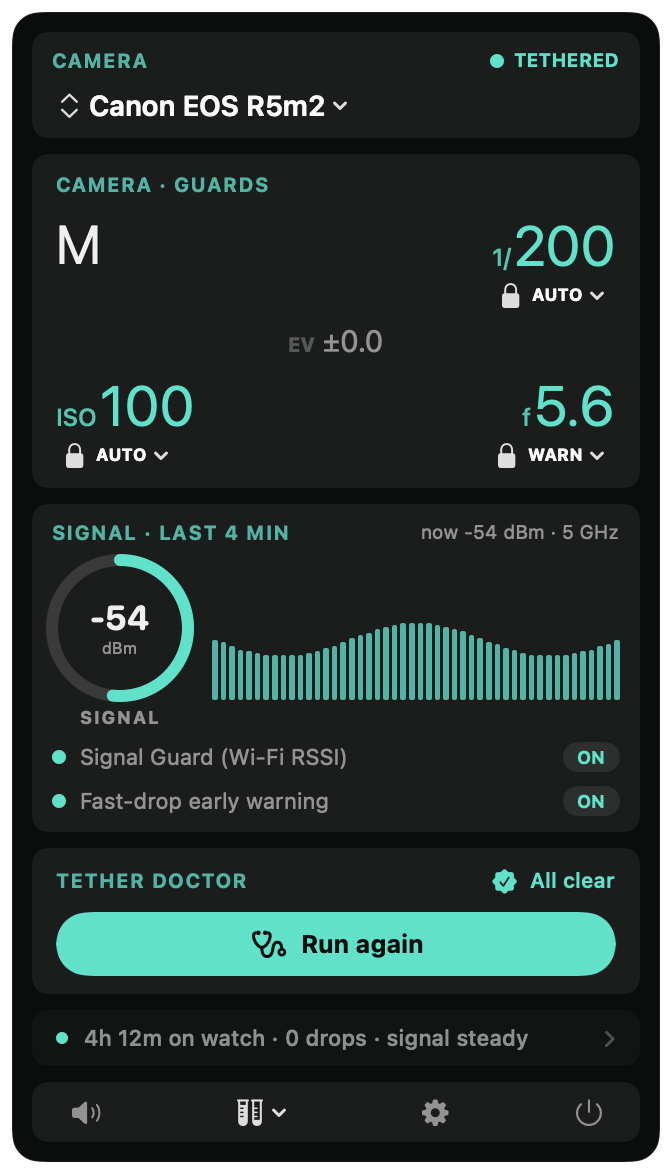
It sits in your menu bar. Every second, it checks: is Capture One tethered, is the camera still on its chosen shutter and aperture, is the Wi-Fi signal holding up, is there room on the disk? The moment any of those goes wrong, it surfaces a card you can't miss, with a sound you can pick. You can silence it instantly, or one tap corrects the camera back. It does not touch your captures, your catalog, or your files.
Why does my Capture One tether keep disconnecting?
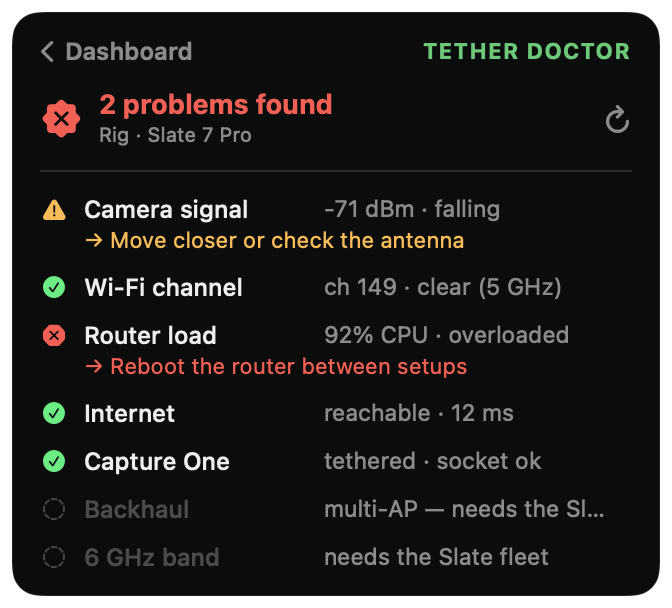
Usually it's the basics: a marginal or overly long USB cable, a hub or port that drops power when the camera is also charging, background software fighting Capture One for the camera (EOS Utility, Imaging Edge), the camera going to sleep, or Wi-Fi interference on a wireless tether. Capture Companion can't fix a bad cable, but it changes the shoot in two ways. The instant Capture One loses the camera it fires a loud alarm and a floating card you can't miss, so you catch the drop on frame one instead of frame fifty. And its one button Tether Doctor checks the whole chain, signal, Wi-Fi channel, router, internet and the Capture One link, and tells you in plain English what's wrong.
Does it work with wireless tethering and the Canon R5 II?
Yes. The whole safety net works on a Wi-Fi tether, and the signal watch is built for it: it reads your camera's RSSI off the router and warns you on a fast drop, before the link actually breaks, tuned per band for 6 and 5 GHz. The Canon R5 II on 6 GHz is exactly the rig it was field tested on. The signal watch and router diagnostics need a router you can read over SSH (GL.iNet / OpenWRT); the disconnect alarm, HUD, drift alerts and disk watch work on any setup, wired or wireless.
Does it work on a USB tether?
Yes, and with a bonus: USB Speed Watch. The disconnect alarm, drift alerts, HUD and disk watch work on any tether, USB or Wi-Fi. On a USB tether, USB Speed Watch reads your tether's USB speed and warns you the moment it drops to USB 2.0, so you catch a tired cable, the wrong port, or a hub before it costs you frames. No router needed for any of it.
How do I know if my tether dropped mid shoot?
That's the whole point of the disconnect alarm. The second Capture One loses the camera, Capture Companion fires a sound you choose and a floating alert card that sits over Capture One even in fullscreen, so you notice immediately instead of shooting blind for fifty frames. When the camera comes back, you get a green all clear. No more glancing at the tether bar between every shot.
Which cameras are supported?
If Capture One Pro can tether it, you're covered, Canon, Nikon, Sony, Phase One, Fujifilm and more all get the disconnect alarm, live HUD and Tether Doctor, because the app reads Capture One rather than the camera. The shutter/aperture/ISO drift alerts work wherever Capture One exposes those values (full on most bodies, partial on Leica). One exception: Hasselblad tethers in Phocus, not Capture One, so it isn't supported. See the full compatibility breakdown.
Does it work with Lightroom?
No, Capture One only. Lightroom doesn't expose your camera's live settings, tether state or disconnects to other apps (its plugin SDK is catalog only), so the disconnect alarm, live HUD and shutter/aperture drift alerts simply can't be built against it. Capture Companion reads Capture One's scripting API, that's what makes all of it possible.
Does it need internet?
Not on set. Everything it watches, it watches on your Mac, with no telemetry and no analytics. When the Mac is online it asks DigiOp's own server once a day for an update and for the latest list of routers it knows, and the Tether Doctor tests the internet path with a plain connection that sends nothing. A problem report goes only when you press Send to DigiOp. None of it ever includes your photos or your shoots. Every address it contacts is listed on the privacy page.
Will it slow Capture One down or interfere with captures?
No. It polls Capture One's published AppleScript API once a second, the same way Capture One Live and Capture Pilot do. It doesn't intercept files, doesn't sit between camera and computer, and never stacks up a second request while one is still running.
Why isn't it on the Mac App Store?
By design. The things that make Capture Companion useful, reading your router's signal, talking to Capture One via AppleScript, and running quietly in the background, are exactly what the App Store sandbox blocks. So it's a direct download: signed and notarised by Apple, so it opens cleanly with no warnings. And the bonus of no sandbox is no telemetry either, it stays 100% local.
What happens after I buy?
You get an email with the download link and an unlock code. The DMG is signed and notarised by Apple, so it opens with no scary warnings. Drop it in /Applications, sign in once with your unlock code, and you're done. The licence works on up to 2 Macs you own.
Do you offer refunds?
14 days, no questions. If it doesn't earn its keep on your next shoot, email us and we'll refund you.